Adobe has introduced Quick Cut in Firefly video editor that lets users automatically turn uploaded raw video footage and AI-generated clips into a structured and polished first cut they can then refine. Creators use natural language input to establish basic parameters including what the video is about, and Quick Cut quickly assembles a structured first edit instantly.
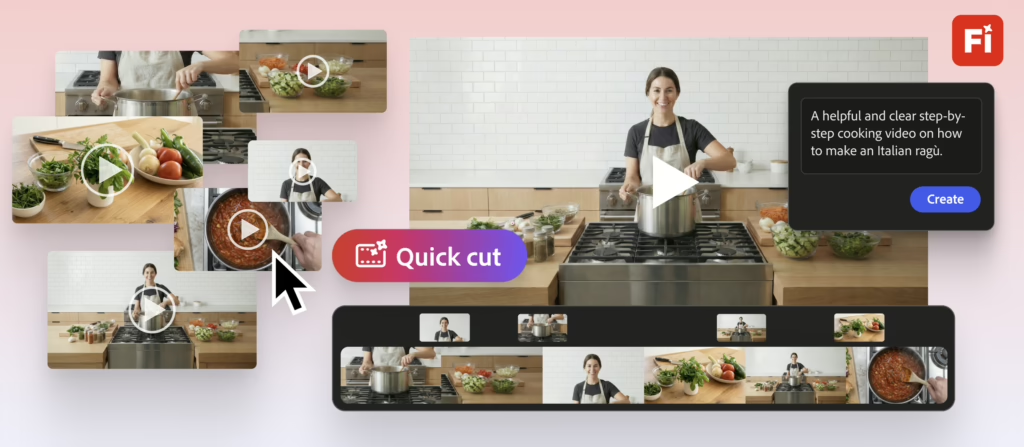
You’ve got rough assets and a story to tell. Adobe’s new AI-powered feature in Firefly puts it together in a first-cut video for you, turning that raw video footage into first-cut video in seconds.
Quick Cut is guided by natural language input from editors, providing them with a starting point that they can then refine into a finished edit. Based on the natural language input from the user, Users upload their footage and describe in their own words what they want the video to be about (an interview, product demo, etc.). Firefly then automatically assembles uploaded or AI-generated clips based on the video’s subject matter/theme, its pacing, and overall length. Users are able to adjust aspect ratios, duration, pacing, and organize supporting footage like B-roll, Adobe says.
Built for hobbyists and time-constrained creators, Quick Cut is positioned for high-volume, quick-turnaround projects such as social media videos, product demos, vlogs, interviews, and event recaps.
Key features of Quick Cut include:
- Automatic scene detection. Processes and reviews video footage to identify visual or audio changes, selects the best cut points, and divides the video into clear clips at suitable intervals.
- Smart shots selection. Automatically selects the best shots by analyzing focus, composition, and action, while saving the user time and reducing manual effort.
- Audio analysis. Automatically detects key dialog and sound cues so important moments are captured in the cut.
- Customization preferences. Allow the user to adjust the video settings and add a B-roll track if desired.
Quick Cut in Firefly video editor (beta) is available now.
WHAT DO YOU THINK? LIKE THIS STORY? TELL YOUR FRIENDS, TELL US.